


Job Search by ZipRecruiter
4.9143.24K Reviews
App Specs
- Version
- 26.11.0
- Updated On
- License
- Free
- Downloads
- 10,000,000+
- Developer
- ZipRecruiter, Inc.
- Categories
- Business
- Platform
- Android, iOS
Screenshots

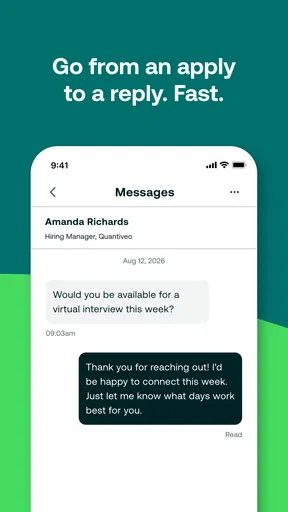
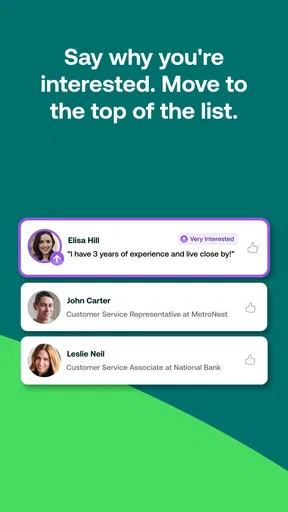
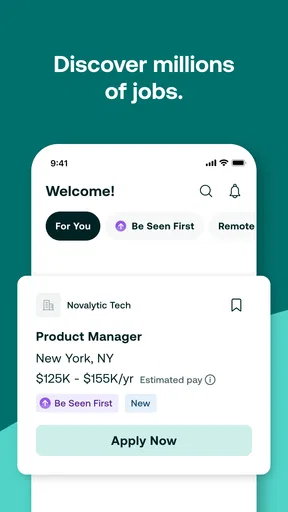
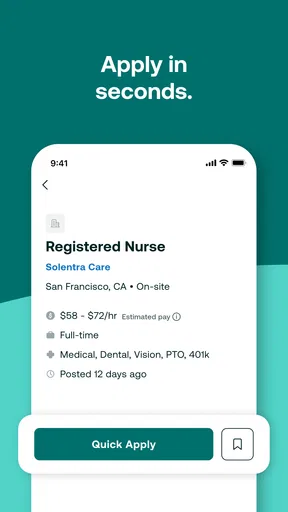
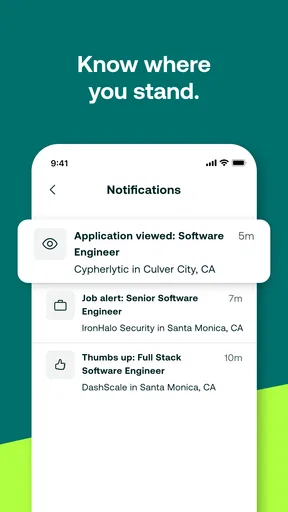
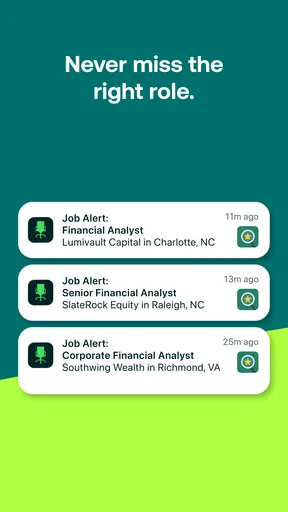
 Analysis by AppCompare
I judge a job-search app less by how many listings it can put on a screen and more by whether it helps me decide what to do next. Job Search by ZipRecruiter is built for people who want a steady stream of opportunities to review without turning every spare moment into a full research session. That can be genuinely useful when you are working, studying, or trying to make a change while keeping your current routine intact.
What free access means in practice
The app is free, which makes it easy to try as one part of a broader search rather than a purchase you have to justify. ZipRecruiter, Inc. is the developer, and the app sits in the business category. Its audience is rated Everyone, so it is intended for a general audience rather than a narrowly age-gated one. I would treat free access as a low-friction way to explore listings and organize a search, not as a promise that every part of the job hunt will happen inside the app or that applying guarantees a response.
That distinction matters. A job-search tool can help you discover openings and act on them, but it cannot make an employer reply, tell you whether a role is a good workplace, or replace careful preparation. I would still read each posting closely, check that the duties and location fit, and tailor application materials where the role warrants it. The app is most valuable when it reduces the effort of finding possibilities, while you remain responsible for choosing which ones deserve your time.
Making a stream of listings manageable
The strongest practical use is to establish a focused search instead of browsing everything. Pick the kinds of roles you can realistically accept, then use the available filters to make the results more relevant. A narrower set is easier to compare and less likely to distract you with jobs that look appealing at first glance but do not match your schedule, experience, or location. I would revisit those choices as circumstances change rather than leave an old search running indefinitely.
Alerts can help you notice a suitable opening while you are away from the app, but they work best as prompts, not instructions to apply instantly. When one arrives, I would open the listing, check the requirements and responsibilities, and decide whether the match is real before using a quick application option. A little review protects you from sending an application simply because a notification made the opening feel urgent.
For example, imagine you already have a job and can only check your phone during a lunch break. A focused alert can bring a potentially relevant role to your attention; you can save the deeper review for a calmer moment, compare it with your priorities, and apply only if it still makes sense. That is a more sustainable routine than repeatedly searching from scratch whenever you find a few spare minutes.
Where it fits among job-search options
Compared with manually checking company career pages one by one, a job-search app can put discovery and filtering in one place, which is handy when you are still exploring possible employers. Compared with a professional networking service, this app is more directly oriented toward finding and applying to openings; networking tools may be a better choice if personal introductions, industry conversations, or building a visible professional profile are central to your plan. I would use the approach that fits the stage of the search, and there is no reason to rely on only one channel.
Worth Reading Before You Choose

Flipboard Shows What News Apps Must Do Beyond the Feed

Switching to Android Auto Means Rethinking Your Driving Routine

Google Calendar Makes a Crowded Week Easier to Manage

Ludo King Makes the Most of the Minutes Between Plans

Baby Panda World Brings Quick Play to Modern Phones, but Its Game Library Feels Busy

ESPN’s Live Game View Makes Following Close Games Easier
Quick application is convenient when your information is current and the role is a sensible match. It is less helpful when an employer expects a tailored cover letter, a portfolio, or answers that need thought. In those cases, a one-tap route can save clicks but not the work that makes an application convincing. Keep a current résumé and a few notes about the roles you are targeting nearby, and pause before sending anything that deserves a more personal response.
A further trade-off is volume versus fit. Seeing more openings can widen your options, but it can also create a pile of near-matches that takes time to sort. I would rather make a smaller number of deliberate applications than treat every listing as an opportunity that must be pursued. Use filters to cut obvious mismatches, then read the remaining descriptions carefully; job titles alone rarely tell the whole story.
Who is likely to get the most out of it
I can see this working especially well for someone who knows roughly what kind of work they want but needs a convenient way to keep an eye on new openings. It can also suit a person comparing several job directions, provided they are willing to refine searches and assess each result rather than expect the app to make the career decision for them. The free price makes that trial straightforward, and the app’s scale is reflected in its 4.9 average rating from around 466,000 ratings, with over 10 million installs.
On the other hand, I would not make it the only resource if you are pursuing a very specialized role, hiring through personal networks, or looking for detailed employer research before applying. In those situations, direct company sites, specialist communities, or conversations with people in the field may offer context a listing feed cannot. If you are not ready to apply, you can still use a job-search tool to learn what employers ask for, but be clear about whether you are researching or actively pursuing a move.
One useful habit is to keep a short record outside the flow of incoming listings: note the employer, the role, the date you applied, and any follow-up you owe yourself. That simple routine makes it easier to avoid duplicate applications and remember where each conversation stands, especially if you are using more than one job-search channel. The app can help with discovery, while a small personal tracking system gives you a clearer view of the whole process.
First Impressions
From the get-go, the Job Search by ZipRecruiter app has a clean and user-friendly interface. You know how some apps just bombard you with too much information? Well, not this one. Everything is neatly organized, making it super easy to navigate. Whether you're tech-savvy or just getting the hang of smartphones, this app welcomes you with open arms.
Features That Stand Out
Once you dive in, the app offers a personalized experience. One of the standout features is the "One-Click Apply". Imagine scrolling through job listings and being able to apply with just one tap. It’s like a fast lane to your next opportunity! No more tedious form-filling every single time.
Another cool feature is the job alerts. You can set them up based on your preferences, so whenever there’s a new listing that matches your criteria, you get a notification. It’s like having a personal assistant who’s always on the lookout for you.
Usability and Performance
The app’s performance is pretty smooth. I didn’t experience any crashes or lags, which is a huge relief. It’s responsive and loads listings quickly, even when you’re on a not-so-great internet connection. Plus, the search filters are quite detailed, allowing you to narrow down your options to find the perfect match.
Personal Takeaway
Personally, I think the app does a fantastic job of simplifying the job search process. It takes a lot of the stress out of finding new opportunities. The design is intuitive, and the features are genuinely useful. If you’re serious about landing a job, this app is definitely worth having in your arsenal.
Overall, Job Search by ZipRecruiter makes job hunting less of a chore and more of an adventure. Whether you’re fresh out of college or looking to switch careers, this app has something for everyone. So, why not give it a shot? You might just find your dream job at the tap of a finger.
Pros
- User-friendly interface for easy navigation.
- Real-time notifications for job applications.
- Wide range of job listings available.
- Customizable job alerts to suit preferences.
- Integrated resume builder feature.
Cons
- Limited international job listings.
- Occasional duplicate job postings.
- Requires account for full functionality.
- Some features need premium access.
- Ad-supported free version.
FAQs for Job Search by ZipRecruiter
What features does the Job Search by ZipRecruiter app offer?
The Job Search by ZipRecruiter app provides a seamless experience for job seekers, featuring one-tap applications, personalized job recommendations, and real-time alerts. Users can easily upload resumes and track applications. The app also includes a salary estimator, allowing users to gauge potential earnings in specific roles or industries.
Is the Job Search by ZipRecruiter app free to use?
Yes, the app is free to download and use on both Android and iOS devices. While it offers many features at no cost, there might be advertisements. Some advanced features or services could require a subscription or additional fees, but the core job search functionality remains free.
How accurate are the job recommendations in the app?
The app uses advanced algorithms to match users with relevant job opportunities based on their profiles and previous searches. While it strives for accuracy, users may still need to review recommendations to ensure they align with their career goals and experience. Regular updates and profile adjustments can improve the precision of these recommendations.
Can I apply for jobs directly through the app?
Yes, users can apply for jobs directly through the app with a single tap. This feature simplifies the application process by using pre-uploaded resumes and cover letters. However, some job postings might redirect users to external websites to complete the application process, depending on the employer's requirements.
How secure is my personal information on the app?
ZipRecruiter prioritizes user privacy and employs robust security measures to protect personal information. Data encryption and secure servers are used to safeguard user data. However, users should remain cautious and regularly review the app’s privacy policy and settings to ensure their information is protected.


